After a long period of time, my baby, semangat45, has been reborn after its long sleep due to the harddisk lost. It can't be helped, I was using a borrowed one. So when the user claimed, I just gave back the harddisk. Okay, enough with chit chat, there is a long way to go and hopefully I'm not getting bored in the writing stuff.
Okay, I was looked at xensource.com and found out that they have made their own virtualization solutions. There was 3: XenExpress, XenEnterprise, and Xen[sumthin, I don't remember quite well]. All was non-free except the XenExpress, so I decided to download the XenExpress.
XenExpress is an ISO contains Xen client (for Windoze and GNU/Linux) and an installation of dom0 (the host). I installed the Windoze client and installed the dom0 at my baby. The installation ran well. It installed itself like common installation, quite neat. I'm getting bored here, so here's the screenshot of the :
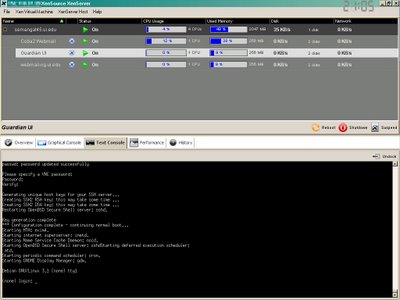
That picture is the windoze client. It is built on Java and I don't like the installer which not opt in a selection whether I could use my own Java which is jdk 1.5 also but higher SP. It would be nice if the installer could guess my own java and no need to install its JRE.
After use the XenExpress, I think come into a conclusion that the client is like the neat version of XenMan and nothing special with the server. It has 3 distro default and I only use one, Sarge. The creation of Sarge isn't so good. It doesn't configure the IP and default is DHCP. It sucks! I can do much.. much better with deb's xen-tools.
The most thing I like beside the intuitive GUI is the Performance tab, which contains CPU, memory, network, and disk. The Graphical Console is a good thing, perhaps, but how to disable it? It uses VNC and I don't like any X on my server .
So, in the end, I can conclude that this is a good solution for graphical based. Many things can be done with deb's tool.
My review:
GUI: Awesome.
Functionality: Good
NEXT: I will try Virtual Iron.
NOTE:
If I not lazy enough, I would like to code and make these tools bundled as one application:
Okay, I was looked at xensource.com and found out that they have made their own virtualization solutions. There was 3: XenExpress, XenEnterprise, and Xen[sumthin, I don't remember quite well]. All was non-free except the XenExpress, so I decided to download the XenExpress.
XenExpress is an ISO contains Xen client (for Windoze and GNU/Linux) and an installation of dom0 (the host). I installed the Windoze client and installed the dom0 at my baby. The installation ran well. It installed itself like common installation, quite neat. I'm getting bored here, so here's the screenshot of the :

That picture is the windoze client. It is built on Java and I don't like the installer which not opt in a selection whether I could use my own Java which is jdk 1.5 also but higher SP. It would be nice if the installer could guess my own java and no need to install its JRE.
After use the XenExpress, I think come into a conclusion that the client is like the neat version of XenMan and nothing special with the server. It has 3 distro default and I only use one, Sarge. The creation of Sarge isn't so good. It doesn't configure the IP and default is DHCP. It sucks! I can do much.. much better with deb's xen-tools.
The most thing I like beside the intuitive GUI is the Performance tab, which contains CPU, memory, network, and disk. The Graphical Console is a good thing, perhaps, but how to disable it? It uses VNC and I don't like any X on my server .
So, in the end, I can conclude that this is a good solution for graphical based. Many things can be done with deb's tool.
My review:
GUI: Awesome.
Functionality: Good
NEXT: I will try Virtual Iron.
NOTE:
If I not lazy enough, I would like to code and make these tools bundled as one application:
- XenMan. It's a good GUI client interface.
- Xen-Tools. It's an awesome collection of scripts. The awesome thing about it also the use of CFEngine.
- LVM manager. Man nothing GUI, yet.
- ISCSIadm. Adding support for ISCSI and perhaps AoE (not that game).

Comments
Post a Comment